Clipboard inbox
Copy a key, press ⌃⌥⌘V. It goes to the Inbox with date and time, and the clipboard is cleared. No program gets it until you turn it into an item; the provider is guessed from the key's prefix.
For macOS 14 and later
Grab a key from the clipboard with one shortcut, or let Secretariat read it off a screenshot, on your Mac. It lives in your iCloud keychain. Agents start your tools through it: the program gets the values, the agent sees [masked]. No server, no account, no subscription.
14 days with everything, no account. After that it keeps working and asks you to buy. Honest about its limits: read the threat model.
# the agent knows the profile, not the values
$ secretariat run acme-shop -- node check.js
STRIPE_SECRET_KEY=[masked acme/stripe/api/api_key]
OPENAI_API_KEY=[masked acme/openai/api/api_key]
connected to Stripe (test mode) ✓
$ git commit -m "add debug dump"
Secretariat guard: commit blocked — staged
changes contain secret values:
dump.txt:1 value of acme/stripe/api/api_key
Demo values. Masking and guard messages as printed by Secretariat 1.7; the guard message is shortened.
The problem
.env. Blocking the file isn't enough.A key in a plain file ends up in the agent's context, in a log, or in a commit sooner or later. This happened in public throughout 2026.
“This is a security-critical issue that should be addressed urgently.”
Claude Code v2.1.12 read .env files despite .claudeignore (issue #20966), reported by The Register, 28 January 2026. Follow-up issues kept coming until June.
“My agent stole my (api) keys”
A developer on r/ClaudeAI (February 2026) had blocked .env. The agent got the keys anyway, via docker compose config.
3.2 % of Claude Code commits leaked a secret, against 1.5 % overall.
GitGuardian's State of Secrets Sprawl 2026 (March) also counts 24,008 secrets in MCP configuration files. Vendor figures.
GitGuardian report →Capture
Keys appear in a dashboard once, in a setup wizard, in a chat. Secretariat catches them where they show up, so they never land in a notes file or a stray .env first.
Copy a key, press ⌃⌥⌘V. It goes to the Inbox with date and time, and the clipboard is cleared. No program gets it until you turn it into an item; the provider is guessed from the key's prefix.
Recovery codes, a setup page, a QR code: paste the screenshot with ⌘V and add a note. Image and note are sealed with AES-GCM, synced through your private iCloud Drive container, and stay blurred until you click Show. No CLI or agent can open them.
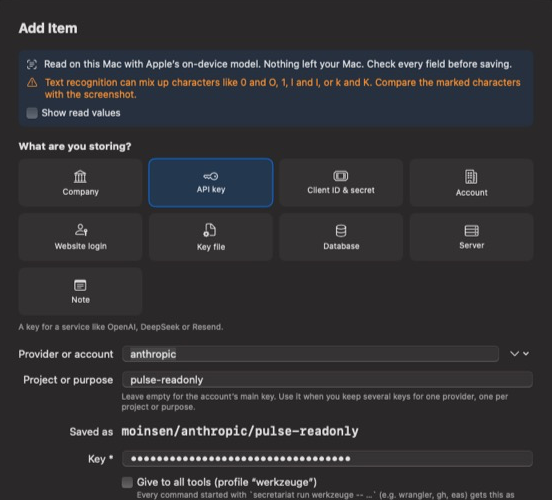
“Create Item …” reads the screenshot with Apple's text recognition and Apple Intelligence on your Mac, picks kind, provider and fields, and opens the item ready to check. Nothing leaves your Mac. Every value must appear in the screenshot, and look-alike characters are marked for you to compare.
Reading a screenshot with Apple Intelligence needs macOS 26 and a Mac that supports it. Without it, Secretariat uses text recognition and known key prefixes, and says so in the dialog.
How it works
Capture it, add it in the guided item dialog, or import an existing .env without reading it. A whole folder tree can be imported at once, with a review list before anything is saved. Your Macs sync through iCloud keychain.
secretariat import .env \ STRIPE_SECRET_KEY \ OPENAI_API_KEY \ --profile acme-shop
A profile maps environment variables to items for one folder. Agents create and bind profiles themselves, using names only. In Claude Code, each session learns at start which profile belongs to the folder.
secretariat profile create \ acme-shop --dir . secretariat profile bind \ acme-shop STRIPE_SECRET_KEY \ acme/stripe/api/api_key
The program gets the values as environment variables. Key files arrive as temporary files with mode 0600. The agent sees the program's output, with known values masked.
secretariat run acme-shop \ -- pnpm dev
secretariat run.Agent Guard
Each layer covers a different way a key escapes: an agent reading it, a program printing it, a commit carrying it, or a leak that already happened years ago.
When output goes to an agent or a pipe, every value the program received becomes [masked path/field] in stdout and stderr. In your own terminal you see the real output.
Mark an item and every run, push or inject that needs it waits for your fingerprint. Agents can switch approval on. Only you, in the app, can switch it off.
A git pre-commit hook refuses any commit that contains a value Secretariat knows. Your actual values, not patterns. Install it in every repository at once:
secretariat guard install \ --all ~/work
A hook refuses cat .env, printenv, docker compose config and reading keychain passwords before they run, and tells the agent to use secretariat run instead.
secretariat guard claude install
Checks every repository and its whole git history for your actual values, and names each key that was ever committed, with the commit. Those are the ones to rotate.
secretariat sweep ~/work
Once every value of a .env is in Secretariat, it goes to the Trash and a .env.example keeps the names. Files with anything unknown stay put.
secretariat tidy ~/work --apply
Everything else
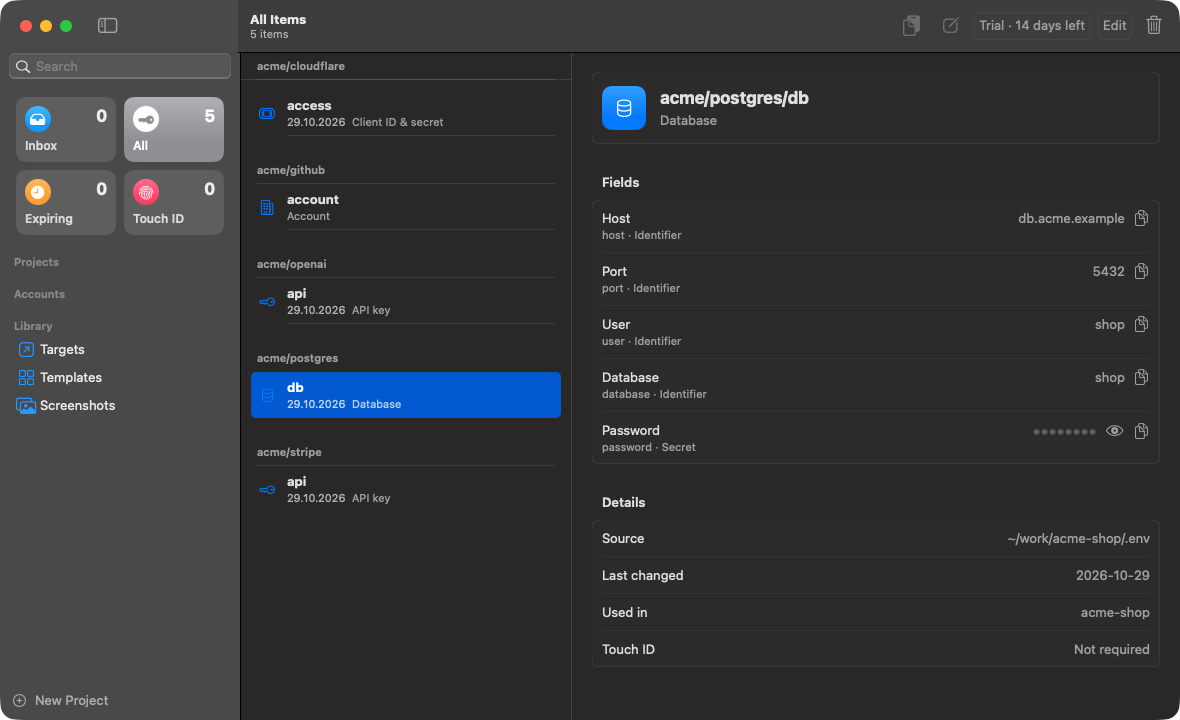
Identifier (agents may read it), secret, file, and only-for-me, which never reaches any program.
Company, API key, client ID & secret, account, website login, key file, database, server, note. Edit them or add your own.
.p8, .p12 or a keystore arrive as a temporary file with mode 0600, only for the program that needs it.
Write values to Cloudflare Workers, Supabase, GitHub, or a Linux env file over ssh.
After you rotate a key, secretariat targets shows every copy that is now stale.
secretariat mcp for Claude Desktop, Cursor and other clients without a shell, with a masked run_command.
A Company item becomes a rule file every Claude Code session reads. Imprints and legal texts fill themselves. Never get asked for your VAT ID again.
Import every .env in a folder tree, review the list, and retire the plain files.
Pick what you're storing, and it asks for the right fields with plain labels. One switch makes a key available to every tool you run.
Give an item an expiry date and it shows up under Expiring 30 days before it stops working, next to the Inbox and your Touch ID items.
Secretariat checks for new versions itself and installs them signed. No App Store, no manual downloads.
A signed, notarized Developer ID app for macOS 14 and later. No background service, no account.
Alternatives
They are good tools, and in 2026 most of them keep values away from agents too. Here is where Secretariat differs. Competitor details as of October 2026.
op run injects it into the child process. Included for password manager users.doppler run injects values; “Doppler for Agents” and an official MCP server. Developer plan free for up to 3 users, Team $21 per user per month.--redact replaces values in output, though the agent's process still receives them; LLM Secrets, secretctl, tsm and others inject values with passkey or Touch ID. All free, most open source.If one of these already covers what you need, keep using it. Prices and features are taken from each vendor's own pages; they change, so check before you decide.
An agent running as your user can call secretariat run itself and write a value to a file. Masking only covers what is printed. The hard boundary is Touch ID per item. The threat model spells out what is protected and what isn't.
Fair question
Absolutely. With a good agent it takes about two days. We know, because that's how Secretariat started.
Day three is keychain access groups and provisioning profiles, so the keys actually reach your other Macs. Day four is notarization rejecting the CLI inside the bundle. Day five is reading how your agent got the keys anyway, via docker compose config. Around day six you notice you've built a secrets manager instead of the thing you wanted to ship.
Vibe-coding is great fun. It just tends to end up somewhere else than planned. We've already spent those days; 39 € buys them back.
Pricing
There is no server to pay for, so there is no subscription. Try the full app for 14 days, then buy a license once and get every 1.x update.
Nothing is ever locked: after the trial, app and terminal show a reminder, but your agents' runs keep working. A run that stops in the middle of a job would cost more trust than it earns.
Payment runs through Lemon Squeezy. As merchant of record they handle VAT, invoices and refunds.
secretariat CLICheckout opens on Lemon Squeezy; launch code LAUNCH29 until 25 November 2026. VAT is calculated there. The license arrives by email and is checked offline.
FAQ
App Store apps must run in a sandbox, and every program they start inherits that sandbox. secretariat run -- wrangler deploy couldn't run your tools or read your project folders. So Secretariat ships as a notarized Developer ID app instead.
Values live in your iCloud keychain. Syncing between your Macs is Apple's iCloud keychain, under your Apple Account. Secretariat itself has no server and sends no data anywhere: no telemetry, no account.
No. Text recognition (Apple's Vision framework) and the language model (Apple Intelligence, on-device) both run on your Mac. Secretariat uses no cloud model and no network for it. Recognized text and suggested values stay in memory until you save the item, and nothing is logged.
Nothing. It's a one-time purchase, not a subscription. The app keeps working, and your keys stay in your keychain.
The app and CLI run on macOS 14 and later. Linux servers are supported as targets: Secretariat can push values to an env file over ssh. There is no Windows support.
Any agent that can run a shell command can use secretariat run. Claude Code also gets the session hint and the company rule file. Claude Desktop, Cursor and other MCP clients without a shell use secretariat mcp.
The source is available: you can read the code on GitHub. The license is still being chosen. What you buy is the license for the signed, notarized build and its updates.
Not by itself. It prevents accidental leaks. Against an agent that actively tries, your boundary is Touch ID approval per item. Details in the threat model.